Roll up to 20 dice with up to 20 sides each
Use our free virtual dice simulator for games, decisions, and fun!
(Click button or press spacebar to roll the dice)
Roll up to 20 dice with up to 20 sides each
Use our free virtual dice simulator for games, decisions, and fun!
(Click button or press spacebar to roll the dice)
Have you ever been in the middle of an exciting board game night when suddenly you realize the dice are missing? Maybe they rolled under the couch, or perhaps your dog decided they looked like a tasty snack. We've all been there, and it's frustrating when the fun has to stop just because you can't find those tiny cubes.
Here's some good news: Calculator.net has created a simple solution that works on any device you own. Their free online dice roller means you'll never have to pause your game again. No downloads, no sign-ups, and no hassle. Just open the website and start rolling.
This guide will walk you through everything you need to know about Calculator.net's dice roller. Whether you're a Dungeons and Dragons player who needs a d20, a Monopoly fan who needs standard dice, or a teacher looking for a fun way to explain probability to kids, this tool has got you covered.
The best part? It's completely free and works on your phone, tablet, or computer. Let's dive in and see why thousands of people choose this dice roller for their gaming needs.

Calculator.net's dice roller is exactly what it sounds like - a virtual tool that simulates rolling real dice. Think of it as having a complete set of dice in your pocket, ready whenever you need them. The website takes something we all know (rolling dice) and makes it available anywhere you have internet access.
You don't need to be tech-savvy to use it. There's no complicated software to download or confusing instructions to follow. Just visit the website, choose your dice, and click a button. Within seconds, you'll see your results displayed clearly on the screen.
The tool works on every device you can think of. Playing on your phone during your commute? No problem. Using a tablet for family game night? Perfect. Sitting at your computer for an online D&D session? It handles that too.
Let's be honest - losing dice is annoying. You buy a game, play it a few times, and somehow those little cubes disappear. With Calculator.net's dice roller, that problem vanishes. Your dice are always right there on your device, ready to go.
Playing games online with friends has become super popular. Video calls are great, but how do you roll dice when you're miles apart? This tool solves that problem instantly. Everyone can visit the same website, and suddenly you're all working with the same dice rolls.
Teachers have discovered this tool is amazing for making math lessons more interesting. Kids love clicking buttons and seeing random numbers appear. It turns boring probability lessons into something interactive and fun.
Step 1: Open your browser
Step 2: Find the tool
Step 3: Choose your dice
Step 4: Click roll
Step 5: Roll again
Perfect for: Classic board games, casual gaming, quick number generation
What you get:
How to adjust:
Results display:
Works great for:
This is where magic happens. Not stuck with just 6-sided dice anymore.

What's possible:
How to use it:
D&D example:
Why this matters:
Imagine you're playing a game and your character swings a sword that does 3d6 damage. With physical dice, you'd need to roll three dice one at a time, then add them up. With Calculator.net's roller, you just set it to three dice and click once.
This feature saves so much time during gameplay. Instead of rolling, picking up dice, rolling again, and calculating, everything happens in one smooth motion.
The individual results show up clearly on screen. You'll see something like: "Roll 1: 4, Roll 2: 2, Roll 3: 5, Total: 11." This transparency is great because everyone can see that the roll was fair.
This is probably the most powerful feature of the whole tool. Physical dice are limited by what manufacturers decide to make. Sure, you can find d4 through d20 pretty easily, but what if your custom game needs a d13?
Calculator.net doesn't care about manufacturing limits. Want a 7-sided die? Type in 7. Need a 50-sided die? Type in 50. The tool will create it instantly and give you a fair, random result.
Game designers love this feature because they can test new games without buying expensive custom dice. Teachers use it to create specific probability exercises. Kids use it to make up their own games.
Let's talk money for a second. A decent set of gaming dice costs anywhere from $10 to $30. Fancy metal dice can run $50 or more. Some serious gamers own multiple sets, spending hundreds of dollars over time.
Calculator.net's dice roller costs exactly zero dollars. Not "free trial then pay." Not "free with ads." Just free, period. You can use it once, or you can use it ten thousand times. The price stays the same: nothing.
There's no sneaky account creation screen that tries to collect your email. No pop-ups begging you to subscribe. Everything you see is available to everyone, all the time.
Morning commute on the bus? Pull out your phone and practice some D&D rolls. Lunch break at work? Quick game on your laptop. Family game night? Use the tablet on the coffee table.
The website uses responsive design, which means it adjusts to your screen automatically. On a phone, everything shrinks down to fit comfortably. On a big computer monitor, it spreads out nicely.
This cross-device compatibility means you're never stuck. Forgot your dice at home but you're at a friend's house? Use their phone. Computer crashed mid-game? Switch to your tablet in seconds.
Picture this: You're at a coffee shop, killing time before an appointment. Your friend texts asking if you want to play a quick game online. With physical dice, you'd be out of luck. With Calculator.net's roller, you're ready to play in seconds.
The convenience goes beyond just having dice available. Physical dice roll off tables, land in weird positions, or roll under furniture. Virtual dice don't have these problems. They stay right there on your screen, clearly showing the result.
Traveling is way easier too. Packing for a trip? Dice are small but they're one more thing to remember and lose. Your phone is coming with you anyway, and the dice roller comes along for the ride without taking up any space.
Here's something most people don't know: physical dice are rarely perfectly balanced. Manufacturing processes aren't exact enough to create truly fair dice. Some sides end up slightly heavier, and wear over time makes things worse.
Virtual dice don't have this problem. The computer generates numbers using mathematical formulas that give each outcome an equal chance. No physical imperfections, no weighted sides, no bias. Just pure randomness.
This matters more in some situations than others. Playing Monopoly with friends? Physical dice are fine. Running a tournament with prizes? Virtual dice ensure nobody has an unfair advantage.
Imagine you want to try a new board game, but it requires special dice you don't own. With physical dice, you'd need to order them online and wait. With the virtual roller, you just type in the numbers and start playing immediately.
This flexibility extends to spontaneous gaming too. Someone suggests a game you haven't played in years. Can you find the dice for it? With the online tool, it doesn't matter. Whatever dice you need, they're instantly available.
D&D players and the virtual dice roller are a match made in heaven. The game requires so many different dice - d4, d6, d8, d10, d12, and the famous d20.
Attack rolls almost always use the d20. Just set the roller to 20 sides, one die, and click. Is your attack an 18? That's probably hitting! Roll a 3? Well, you probably missed.
Damage rolls often need multiple dice at once. Your wizard's fireball does 8d6 damage? Set the roller to eight 6-sided dice and click once. The total appears immediately.
Online D&D sessions over video chat work perfectly with this tool. Everyone can visit the same website. No more "I rolled a 17, trust me" - everyone sees the actual roll happen.
Classic board games were basically built around dice. Monopoly needs two standard dice for movement. The roller handles this perfectly - just set it to two 6-sided dice and you're rolling doubles or not.
Yahtzee players love this tool because rolling five dice at once is smoother than physical rolling. You can clearly see all five results, decide which to keep, and reroll the others.
Backgammon is another perfect match. The game uses two dice, and the online roller makes it easy for both players to trust the results.
Pathfinder uses the same variety of dice as D&D. Everything from d4s for small daggers up to d20s for skill checks. The virtual roller gives Pathfinder players the same benefits - instant rolls and perfect fairness.
Call of Cthulhu uses primarily d100 rolls plus some d6s. The virtual roller can just generate a number from 1 to 100 directly. Easier, faster, and less confusing.
Warhammer players deal with buckets of d6s. Some attacks require rolling 20 or 30 dice at once. The virtual roller can handle these massive rolls without you needing to own a hundred physical dice.
Teachers have discovered that Calculator.net's dice roller turns boring math lessons into something kids actually enjoy. Probability suddenly makes sense when you can roll a die 50 times and watch the results.
Addition practice becomes a game. Roll two dice, add them up. Check your answer with the total shown on screen. Kids can do this independently without needing constant teacher supervision.
Graphing exercises work great too. Have students roll a die 30 times and graph how often each number appears. The virtual roller makes this quick - no hunting for dropped dice.
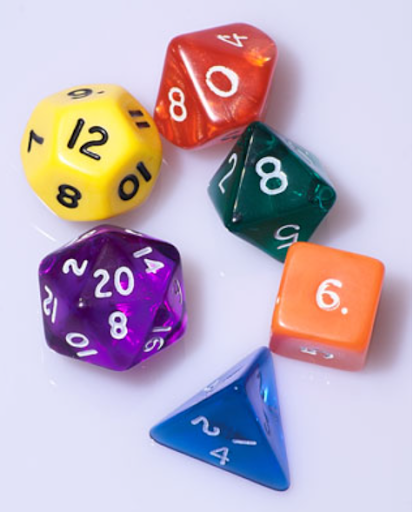
The 4-sided die (d4) looks like a little pyramid. These dice are used for small amounts of damage or minor random effects in games.

Everyone knows the 6-sided cube (d6). This is the classic die that appears in probably 90% of board games ever made. It's simple, familiar, and perfect for basic random number generation.
The 8-sided die (d8) looks like two pyramids stuck together at their bases. It's a common middle ground in RPGs. Weapons like longswords often use d8s for damage rolls in D&D.
The 12-sided die (d12) looks like a soccer ball's cousin. It's less common than other dice but shows up for certain weapons. Greataxes in D&D use d12s for damage.
The 20 sided dice (d20) is the superstar of gaming dice. In D&D, almost everything important uses a d20 - attack rolls, saving throws, skill checks.
The number of sides on a die directly affects the range of possible outcomes. A d6 gives you numbers 1 through 6 - pretty limited. A d20 gives you 1 through 20 - much more variety.
Games that want tight, predictable outcomes use smaller dice. Monopoly uses 2d6 because the designers wanted movement to cluster around 7. You'll rarely move 2 spaces or 12 spaces, but you'll move 7 pretty often.
RPGs use d20s for important rolls because they want drama and uncertainty. With a d20, the difference between success and failure is often just one number. That uncertainty creates tension and excitement.
Physical dice have problems that most people never think about. The paint used to mark the pips has weight. Drilling holes for higher numbers removes material. These tiny imperfections create biased dice that favor certain numbers.
Manufacturing imperfections make things worse. Air bubbles in the plastic, uneven cooling, rough edges - all of these affect how the die rolls.
Virtual dice don't have any of these physical problems. There's no weight, no manufacturing imperfections, no wear and tear. The randomness comes from computer algorithms instead of physics.
The tool uses what's called a pseudo-random number generator. This is a mathematical formula that produces numbers that look and behave randomly.
When you click the roll button, the generator grabs a "seed" value - usually based on the current time. It then runs this through complex mathematical operations that scatter the results across all possible numbers.
The important thing is that each number has an equal chance of appearing. Roll a 6-sided die, and you have exactly a 1-in-6 chance for each number. The math enforces fairness that physical dice can only approximate.
Nobody wants to spend the first 15 minutes of game night figuring out technology. Before your friends arrive, open Calculator.net's dice roller on whatever device you'll use.
Bookmark the page on your device so you can find it quickly later. Most browsers let you save bookmarks or add pages to your home screen.
If you're using a tablet or phone, adjust the screen brightness so everyone can see the results clearly. Too dim and people across the table can't see. Too bright and you'll blind everyone.
Assign one person to be the official roller if that works for your group. They can sit where everyone can see the device and handle all the rolling.
Alternatively, have everyone use their own device. Modern groups where everyone has a smartphone can each roll their own dice.
Call out results clearly so everyone hears them. Even though people can see the screen, saying "I rolled a 15" out loud helps everyone track what's happening.
First, check your internet connection. Try opening another website. If that doesn't work either, your internet is probably down.
If other websites work fine but Calculator.net won't load, try refreshing the page. Sometimes pages just hiccup during loading, and a refresh fixes it instantly.
Try clearing your browser cache and cookies, then reload the page. Every browser has this option in its settings, usually under "Privacy" or "History."
Double-check that you actually clicked the roll button. Sometimes in the excitement of the game, people think they clicked but didn't.
Make sure you've selected a number of dice. Some versions of the tool won't roll if you haven't told it how many dice to generate.
Try reloading the entire page if results consistently won't show. Something might have glitched in the page's code.
Google has a built-in dice roller. Just search "roll a die" and Google shows a simple roller right in the search results. It works fine for basic 6-sided dice but lacks customization options.
Many gaming websites offer dice rollers as part of larger gaming suites. Sites dedicated to D&D often include dice tools alongside character sheets.
Phone apps are another option. Both app stores have dozens of dice rolling apps. Some are simple, some are elaborate with sound effects. They work offline, which is a nice bonus.
The clean, simple design makes Calculator.net especially appealing. Some alternatives are cluttered with ads or complicated menus. Calculator.net gets straight to the point.
Loading speed is notably fast. The page doesn't have heavy graphics weighing it down. You visit the site, and boom, you're ready to roll.
No ads is a huge plus. Many free dice rollers bombard you with advertisements. Calculator.net keeps things clean and focused.
Dice are one of humanity's oldest gaming tools. Archaeologists have found dice-like objects that are over 5,000 years old. Ancient civilizations in Mesopotamia, Egypt, and India all used dice for games.
Ancient Romans were absolutely crazy about dice games. Even Roman emperors were known to be passionate dice players. They used dice made from bone, ivory, or bronze.
The oldest known dice were made from animal bones, specifically ankle bones. These bones naturally fall in four different stable positions, making them perfect for creating random outcomes.
Understanding dice probability is simpler than it sounds. For a standard 6-sided die, each number has an equal 1-in-6 chance of appearing. That's about 16.67% for each number.
Rolling two dice creates more complex probability. There are 36 possible combinations. However, some totals are more likely than others. You can only roll a 2 one way, but you can roll a 7 six different ways.
This is why 7 is the most common result when rolling two 6-sided dice. Games like Monopoly use this probability distribution to control gameplay pacing.
Calculator.net's dice roller is honestly a game-changer for anyone who loves board games, D&D, or just needs a quick random number. It's simple, free, and works everywhere. You don't need to download anything or create an account - just open the website and start rolling.
Whether you lost your dice, you're playing online with friends, or you just want something more fair than your old worn-out dice set, this tool has you covered. The best part? It handles everything from simple 6-sided dice to complex 20-sided rolls for your RPG campaigns.
Next time you're setting up game night, save yourself the hassle of searching for missing dice. Just pull up calculator.net on your phone or laptop, and you're ready to play. It's that easy. Give it a try for your next game session. You might find yourself using it more than your physical dice!
Yes, it's completely free. No hidden costs, no subscriptions, and no account needed. Just visit the website and start rolling.
Nope! It works directly in your web browser. No downloads or installations required. Just open the website on any device.
Absolutely! It's perfect for D&D. You can roll d4, d6, d8, d10, d12, and d20 dice. Roll multiple dice at once for damage calculations too.
You can roll multiple dice in one go. The tool handles everything most games need without any problems.
Yes, it uses computer algorithms to generate random numbers. It's actually more random than most physical dice, which can be slightly unbalanced.
Yes! It works great on smartphones, tablets, laptops, and desktop computers. The website adjusts to fit any screen size.
No, you need an internet connection to use it. But most people have internet on their phones these days, so it's rarely an issue.
Yes! The non-conventional dice roller lets you create dice with any number of sides you want. Perfect for custom games.
Definitely! Just set it to roll two 6-sided dice for Monopoly or five 6-sided dice for Yahtzee. Works perfectly for classic board games.
No account needed. Just visit the website and start using it immediately. No emails, passwords, or personal information required.
Yes! Each person can open the website on their own device. Or you can all share one screen and take turns rolling.
No limit! Roll as many times as you need. Whether it's 10 rolls or 1000 rolls, the tool never stops you.
This rarely happens, but if it does, try refreshing your browser or checking your internet connection. Calculator.net is usually very reliable.
Yes! It's a great educational tool. Kids can see how random numbers work and practice math concepts in a fun, visual way.
The basic version shows your current roll results. If you need to track rolls over time, you might want to write them down separately or take screenshots.